
前言
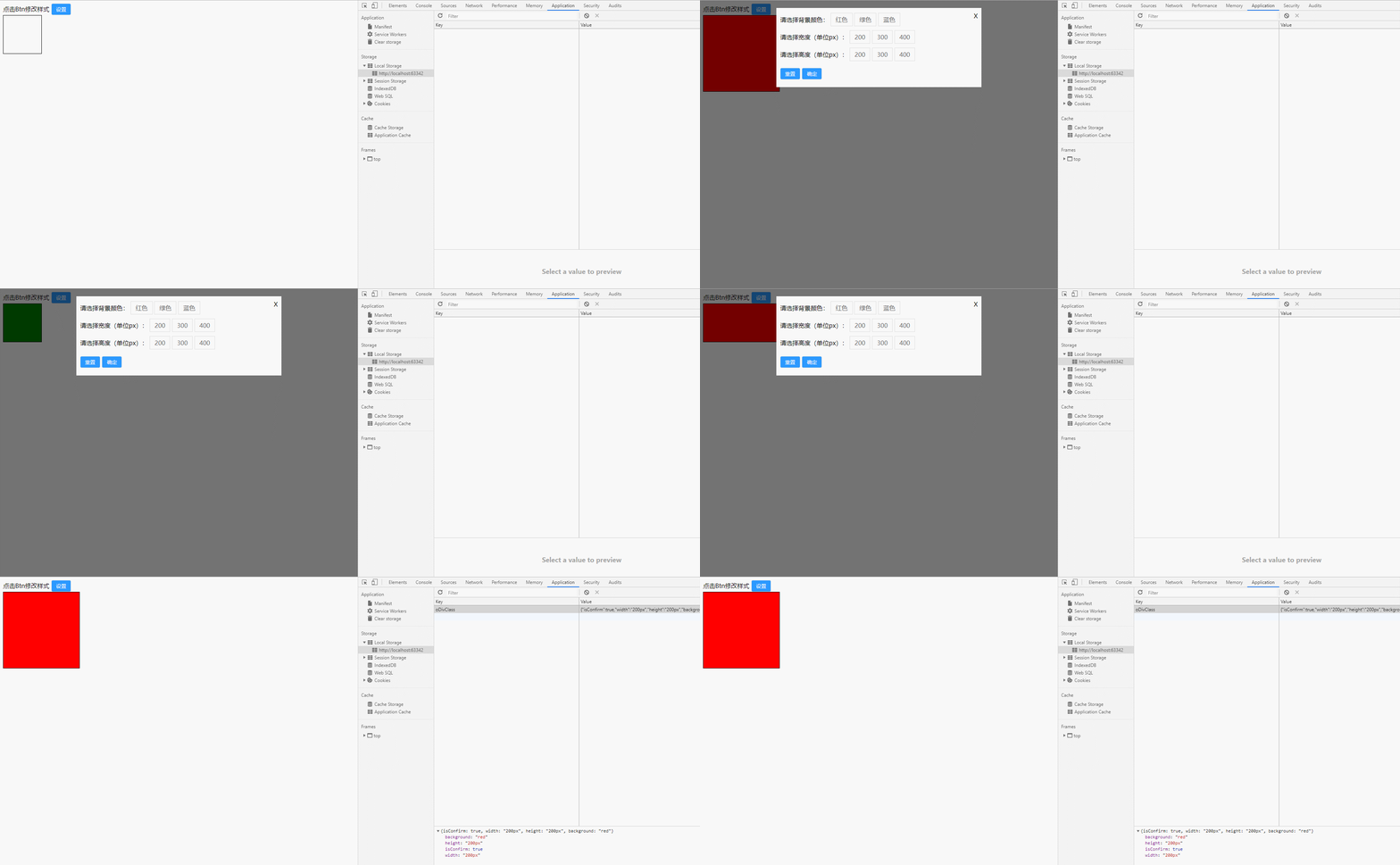
因为即将要出去实习了,趁着周末有空复习了一下原生JavaScript,这是一个通过本地存储实现的换肤功能。
效果
代码
- css 部分可能比较简单,通俗点说就是有点丑0.0
.btn {
            padding: 6px 12px;
            border: 1px solid #ddd;
            background: #2b99ff;
            color: #fff;
            border-radius: 4px;
            outline: none;
            cursor: pointer;
        }
        .oDiv {
            width: 100px;
            height: 100px;
            border: 1px solid;
        }
        .moadl {
            position: fixed;
            top: 0;
            left: 0;
            bottom: 0;
            right: 0;
            background: rgba(0,0,0,0.55);
            display: none;
        }
        .dialog {
            width: 520px;
            margin: 20px auto;
            background: #ffffff;
            padding: 20px 10px;
            position: relative;
        }
        .close {
            position: absolute;
            top: 10px;
            right: 10px;
            cursor: pointer;
        }
        .setBg , .setWidth, .setHeight
        {
            margin-bottom: 25px;
        }
        .setBg a, .setWidth a, .setHeight a {
            padding: 6px 12px;
            border: 1px solid #ddd;
            text-decoration: none;
            color: #666;
        }
- html 结构
<div class="main">

        <div class="header">
            点击Btn修改样式 <button type="button" id="setClass" class="btn" onclick="moadlShow()">设置</button>
        </div>

        <div class="content">
            <div class="oDiv" id="oDiv">

            </div>
        </div>

    </div>

    <!--modal-->
    <div class="moadl" id="myMoadl">
        <div class="dialog">
            <div class="content">
                <div class="close" onclick="moadlClose()">
                    X
                </div>
                <div class="setBg">
                    <span>请选择背景颜色:</span>
                    <a href="javascript:;" onclick="setColor(0)">红色</a>
                    <a href="javascript:;" onclick="setColor(1)">绿色</a>
                    <a href="javascript:;" onclick="setColor(2)">蓝色</a>
                </div>
                <div class="setWidth">
                    <span>请选择宽度(单位px):</span>
                    <a href="javascript:;" onclick="setWorH(0, 'w')">200</a>
                    <a href="javascript:;" onclick="setWorH(1, 'w')">300</a>
                    <a href="javascript:;" onclick="setWorH(2, 'w')">400</a>
                </div>
                <div class="setHeight">
                    <span>请选择高度(单位px):</span>
                    <a href="javascript:;" onclick="setWorH(0, 'h')">200</a>
                    <a href="javascript:;" onclick="setWorH(1, 'h')">300</a>
                    <a href="javascript:;" onclick="setWorH(2, 'h')">400</a>
                </div>
                <div class="btn-group">
                    <button class="btn" type="button" id="reset" onclick="resetClass()">重置</button>
                    <button class="btn" type="button" id="confirm" onclick="confirmClass()">确定</button>
                </div>
            </div>
        </div>
    </div>
- JavaScript
// common
        var oDiv = document.getElementById('oDiv');
        var myMoadl = document.getElementById('myMoadl');
        var isConfirm = false;

        // 初始化判断是否存在本地存储样式
        function initoDivClass() {
            if (localStorage.getItem('oDivClass')) {
                let oDivClass = JSON.parse(localStorage.getItem('oDivClass'));
                with (oDiv.style) {
                    width = oDivClass.width;
                    height = oDivClass.height;
                    background = oDivClass.background;
                }

            } else {
                with (oDiv.style) {
                    width = 100 + 'px';
                    height = 100 + 'px';
                    background = '';
                };
            }

        };
        initoDivClass();

        // modal show
        function moadlShow() {
            myMoadl.style.display = 'block';
        };

        // modal close
        function moadlClose() {
            if (localStorage.getItem('oDivClass')) {
                let oDivClass = JSON.parse(localStorage.getItem('oDivClass'));
                if (oDivClass.isConfirm) {
                    myMoadl.style.display = 'none';
                    with (oDiv.style) {
                        width = oDivClass.width;
                        height = oDivClass.height;
                        background = oDivClass.background;
                    }
                } else {
                    with (oDiv.style) {
                        width = 100 + 'px';
                        height = 100 + 'px';
                        background = '';
                    };
                    myMoadl.style.display = 'none';
                }
            } else {
                if (isConfirm) {
                    myMoadl.style.display = 'none';
                } else {
                    with (oDiv.style) {
                        width = 100 + 'px';
                        height = 100 + 'px';
                        background = '';
                    };
                    myMoadl.style.display = 'none';
                }
            }
        };

        // set color
        function setColor(index) {
            let colorArr = ['red', 'green', 'blue'];
            oDiv.style.background = colorArr[index];
        };

        //  width && height arr
        const whArr = [200, 300, 400];
        function setWorH(index, _type) {
            if (_type == 'w') {  // 设置宽度
                oDiv.style.width = whArr[index] + 'px';
            } else if (_type == 'h') {
                oDiv.style.height = whArr[index] + 'px';
            };
        };

        // reset
        function resetClass() {
            with (oDiv.style) {
                width = 100 + 'px';
                height = 100 + 'px';
                background = 'none';
            }
            isConfirm = false;
            localStorage.removeItem('oDivClass');
        }

        // confirm
        function confirmClass() {
            myMoadl.style.display = 'none';
            isConfirm = true;
            let oDivClass = {
                isConfirm: isConfirm,
                width: oDiv.style.width,
                height: oDiv.style.height,
                background: oDiv.style.background
            };
            localStorage.setItem('oDivClass', JSON.stringify(oDivClass));
        }
总结
不知道说什么 。 。 。